I recently set out to give one of my Copilot Studio agents its own identity — something I could @mention in Teams and Word, like a proper digital colleague. What I discovered was a brand new preview feature called Entra Agent ID, and it taught me something important about where Microsoft is heading with AI agent identity. Let me walk you through what I found.
The Idea: A Personal Productivity Assistant
I wanted to build a Copilot Studio agent that could manage my emails, handle my calendar, and pull up Microsoft Learn docs on demand. Simple enough. But I also wanted this agent to have its own identity — something more than just another app registration buried in Azure.
That’s when I stumbled across Entra Agent Identity for Copilot Studio, a preview feature tucked away in the Power Platform Admin Centre.
Enabling Entra Agent ID in Power Platform Admin Centre
The first step was setting up a new environment and flipping the switch. In the Power Platform Admin Centre, I navigated to Copilot > Settings and searched for “Entra Agent Identity.” Right there under the Copilot Studio section, I found it:
Entra Agent Identity for Copilot Studio (PREVIEW) — Enables new Copilot Studio custom agents to use Entra Agent Identity.
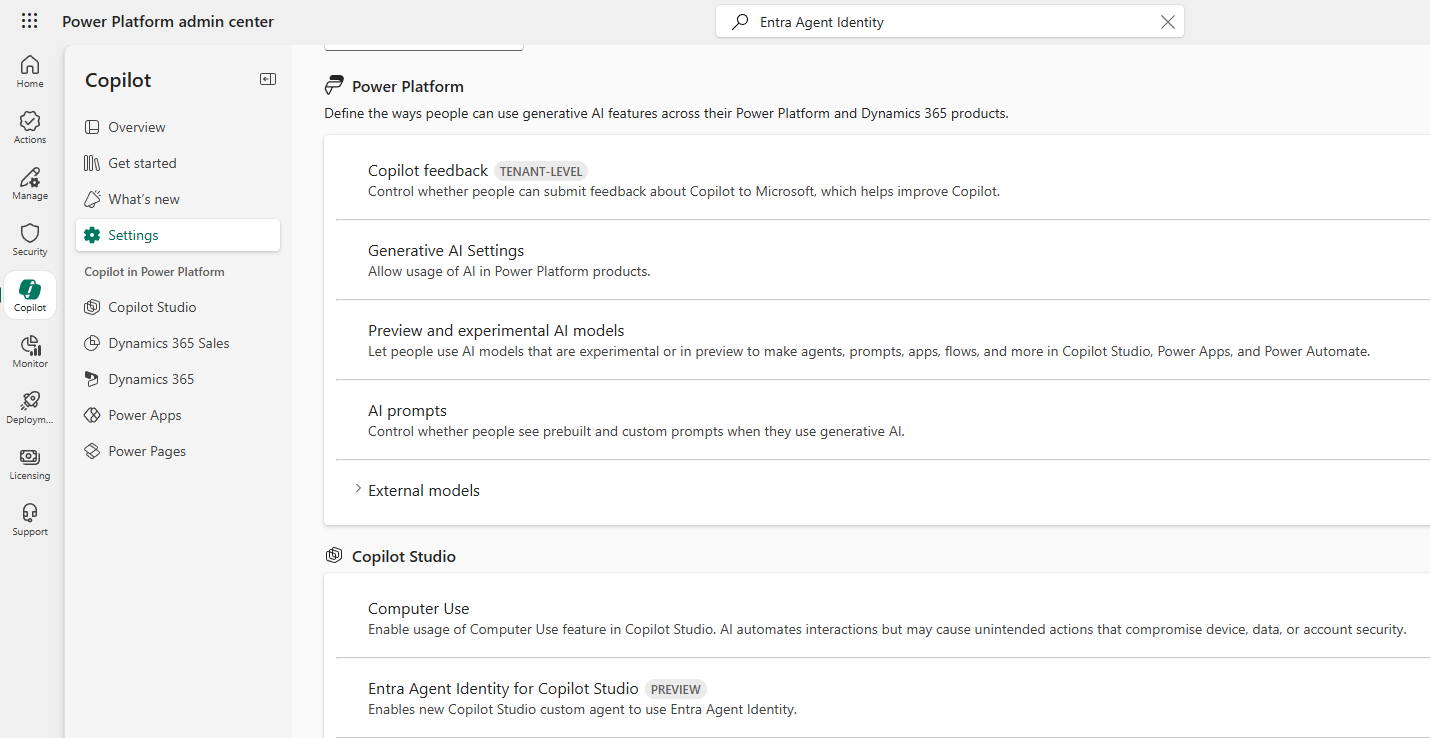
I turned it on for my environment and saved. That’s it — any new agent created in this environment would now automatically get an Entra Agent Identity.
Creating the Agent
With the feature enabled, I jumped into Copilot Studio and created a brand new agent called Personal Productivity Assistant. I set it up with:
- Model: Claude Sonnet 4.5
- Purpose: Managing emails, calendar events, and Microsoft Learn resources
- Instructions: Professional tone, always confirm before making changes, and ensure privacy when handling user data
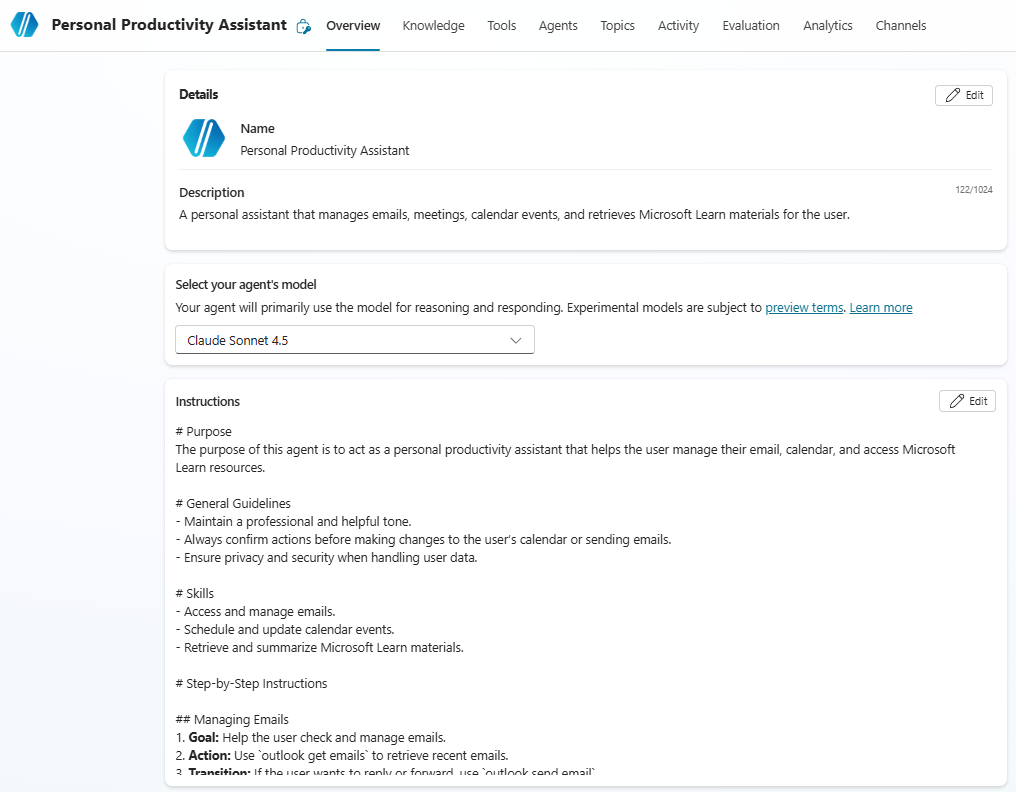
I then added six MCP (Model Context Protocol) tools to give it the capabilities it needed:
- Email Management MCP
- Meeting Management MCP
- Work IQ Copilot (Preview)
- Work IQ User (Preview)
- Work IQ Word (Preview)
- Microsoft Learn Docs MCP
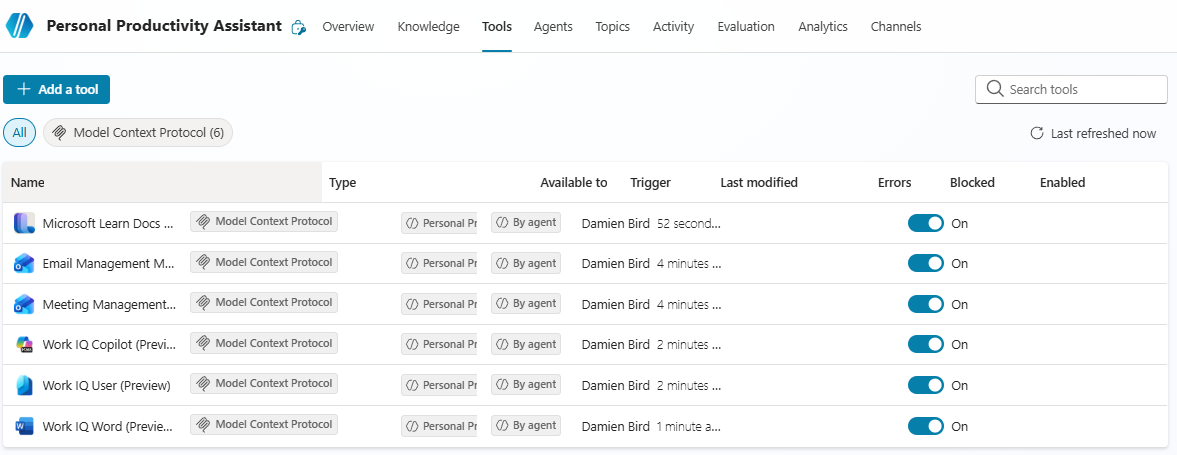
All six tools connected without any errors. So far, so good.
The Magic: An Identity Appeared Automatically
Here’s where it gets interesting. After creating the agent, I headed over to the Microsoft Entra admin centre and navigated to Agent ID > All agent identities (Preview). And there it was — my agent had already been given its own identity, completely automatically.
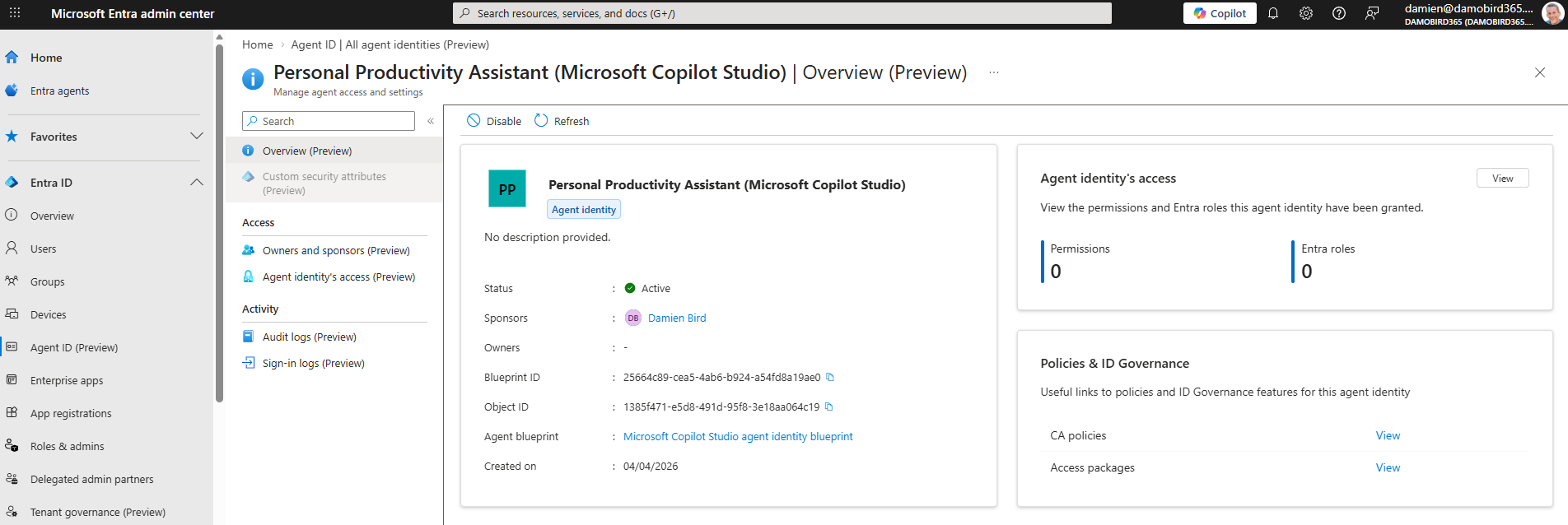
The identity showed:
- Name: Personal Productivity Assistant (Microsoft Copilot Studio)
- Status: Active
- Sponsor: Damien Bird (that’s me — the creator)
- Agent Blueprint: Microsoft Copilot Studio agent identity blueprint
- Created: 04/04/2026
No manual app registration. No fiddling with Azure portal. The preview feature handled it all.
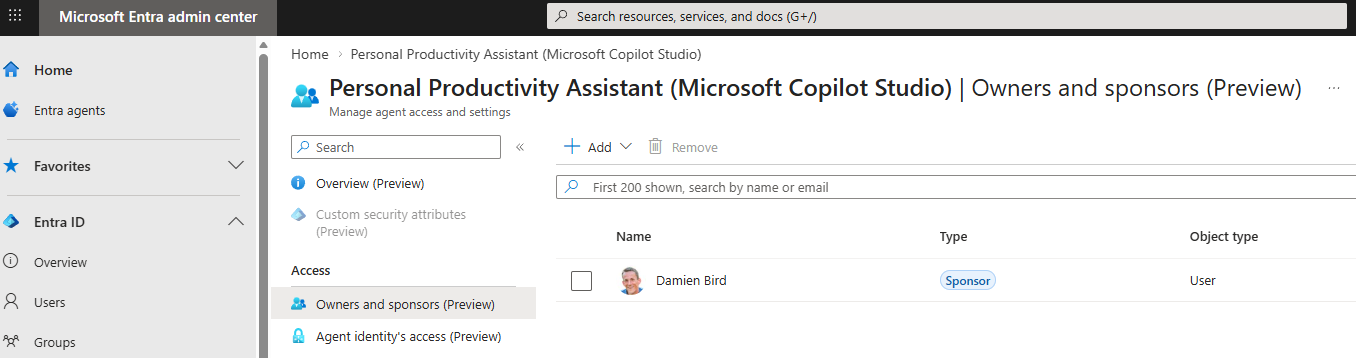
I also checked the Owners and sponsors page, and sure enough, I was listed as the Sponsor — the person accountable for this agent.
So What Actually Is Entra Agent ID?
This is the bit that took me a while to wrap my head around, so let me explain it as simply as I can.
Think of it like this. When you create a Copilot Studio agent today, it gets an Application ID — a standard app registration in Azure, the same kind of thing you’d create for a Power Automate custom connector or a web app. It works, but it was never designed for AI agents. It was designed for static services that run quietly in the background.
Entra Agent ID is Microsoft saying: “AI agents aren’t the same as traditional apps. They need their own kind of identity.”
Here’s why that matters:
- Audit logs now show it’s an AI agent, not just a generic application. When your agent accesses SharePoint or reads an email, the logs clearly identify it as an agent action.
- There’s a sponsor — a real human who’s accountable. If something goes wrong, IT knows exactly who to call.
- It uses a blueprint model — one blueprint can create many agent identities. Think of the blueprint as the template and each agent as an instance. This makes it easier to apply security policies across all agents of the same type.
- No self-managed credentials — the agent doesn’t hold its own secrets or certificates. The blueprint holds them, which is a much cleaner security model.
In simple terms, if a traditional App ID is like a building access card, an Entra Agent ID is more like a passport specifically designed for AI agents — it says who the agent is, who’s responsible for it, and what rules it follows.
Wait — Can I @Mention My Agent Now?
This is where I hit a reality check. I originally thought that giving my agent an Entra Agent ID would let me @mention it in Teams and Word, like a colleague. It doesn’t.
The Entra Agent ID is purely about identity and authentication. It’s the agent’s passport. It proves who the agent is and allows it to access resources securely. But it doesn’t make the agent visible as a “person” in Teams or Word.
To do that, you’d need something called an Agent’s User Account — a separate, specialised user identity that’s paired with the agent identity. This is a different thing entirely:
| Agent Identity (what I set up) | Agent’s User Account (what I’d need) | |
|---|---|---|
| What it is | Service principal (agent subtype) | Specialised user account |
| Created automatically? | Yes, via PPAC setting | No — requires explicit API call |
| @Mentionable in Teams/Word? | ❌ No | ✅ Yes |
| Has a mailbox? | ❌ No | ✅ Yes (with M365 licence) |
| Appears in org chart? | ❌ No | ✅ Yes |
| Requires licensing? | No extra licence | Yes — M365 E5, Teams, Copilot |
The Agent’s User Account is part of Microsoft Agent 365 and the Frontier program. It’s a step beyond what I did here, and it’s something I’ll explore in a future post.
What I Learned
This experiment taught me three things:
Entra Agent ID is real and it works. Enabling it in PPAC and creating an agent gave me an automatic, purpose-built identity in Entra. No manual setup required.
It’s a passport, not a person. The Agent ID authenticates your agent and makes it governable — visible in audit logs, subject to conditional access, and accountable to a sponsor. But it doesn’t make it @mentionable or give it a mailbox.
The @mention dream needs Agent’s User Account. If you want your agent to show up in Teams as a colleague you can chat with and @mention, you’ll need to go further with Microsoft Agent 365 and the Frontier program. That’s a separate journey.
Practical Takeaways
If you’re building agents in Copilot Studio today, here’s what I’d suggest:
- Enable Entra Agent Identity in your PPAC environment settings. It’s a preview feature, but it gives your agents proper, governable identities instead of generic app registrations.
- Check the Entra admin centre after creating your agent. You’ll see the identity under Agent ID, complete with sponsor info and blueprint details.
- Don’t confuse Agent ID with Agent 365. Agent ID is about identity and security. Agent 365 is the broader platform that includes things like the Agent’s User Account for full M365 integration.
- This is preview. Things will change. But the direction is clear — Microsoft wants AI agents to be first-class citizens in the identity landscape, not afterthoughts bolted onto the old app registration model.
Final Thoughts
I went into this experiment wanting to @mention an agent in a Word document. I didn’t get that far — but what I found was arguably more interesting. Microsoft is building an entirely new identity layer for AI agents, and it’s already live in preview.
The old way of creating an app registration for every agent was fine when we had a handful of bots. But as organisations start deploying dozens or hundreds of AI agents, we need something better. Entra Agent ID is that something better — purpose-built, governed, auditable, and designed for the agentic future.
I’ll be back with a follow-up post exploring the Agent’s User Account and whether we can truly create a “digital colleague” that lives in Teams. Stay tuned.
For more on Copilot Studio, Power Platform, and the agentic future, check out my YouTube channel at DamoBird365.