What if a new website enquiry could be classified, researched, answered, and brought to your attention before you had even opened the notification? In this demo, I build an inbound lead workflow in Copilot Studio that does exactly that. It is a useful example of agentic automation, but I also wanted to look beyond the successful demo and understand what the two test runs actually cost.
The Inbound Lead Scenario
The process begins on the contact form on my website. A potential customer provides their contact details, timescale, requirements, and an indication of the support or training they are interested in.
Behind the scenes, my existing Power Automate cloud flow receives the form submission through an HTTP endpoint, creates an item in a SharePoint list, and emails me a copy. The Copilot Studio workflow then starts when that new SharePoint item is created.
This separation is important. I did not need to rebuild the public form or replace the existing intake process. I added an agentic layer to the data that was already being captured.
Classifying the Enquiry with an LLM
The first intelligent step is Classify. It reads the description supplied by the customer and routes the enquiry into one of several categories:
- Consulting or support
- One-to-one or group training
- Event speaker
- Video or blog idea
- Other
Instead of building a large set of conditions around specific keywords, the language model interprets the request and chooses the most appropriate branch.
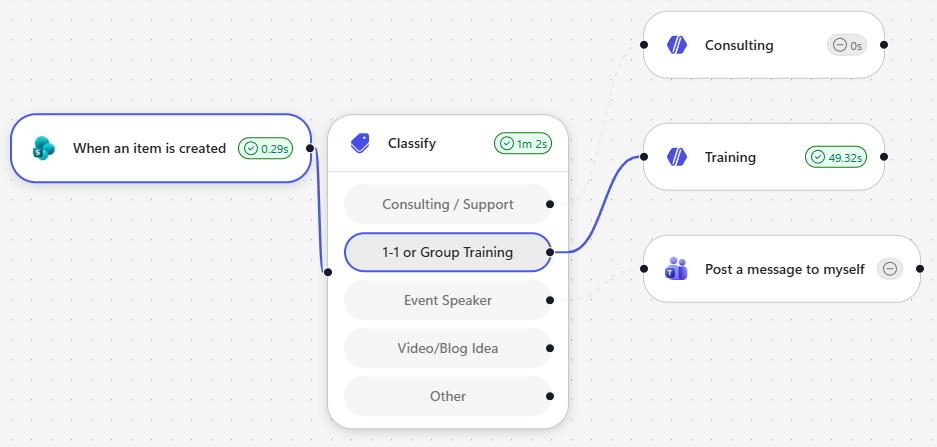
This is where the workflow becomes more than a traditional automation. Classification decides what should happen next, but I can choose how much autonomy to give each branch.
Delegating the Consulting and Training Branches to Agents
I used agents for two branches: Consulting and Training. The remaining branches can use simpler deterministic actions where an agent is not necessary.
Consulting and Support
The consulting agent receives the original form submission and some instructions about how I work. For example, I do not offer reactive production support, but I can proactively assess and improve an existing solution.
The agent has access to two actions:
- Create a draft email response in Outlook.
- Send me a message in Microsoft Teams.
The email remains a draft, giving me a human approval point before anything is sent to the potential customer.
One-to-One or Group Training
The training agent also receives the customer’s enquiry, but it has an additional job. It queries a Microsoft List containing my available courses, durations, and prices so it can establish which training options are relevant.
Its instructions also include details such as group pricing, the maximum group size, and the need to establish whether training will be remote or in person. Because I am based in Aberdeen, an in-person course might also require travel and expenses.
This agent has two actions:
- Send the customer an email response.
- Send me a message in Microsoft Teams.
For the demo, I deliberately allowed this branch to send the email automatically rather than create a draft.
Responding to Leads in Seconds
I tested the workflow with two different submissions.
The first requested advanced Copilot Studio and workflow training. The classifier selected the training branch, the agent checked the course list, identified two relevant courses, calculated the pricing, asked whether the delivery should be remote or in person, and emailed the response.
The second submission asked for help with a production-ready solution. The classifier selected consulting and support. That agent respected the instruction that I do not provide reactive production support, created a draft offering proactive assessment and consulting, and notified me in Teams.
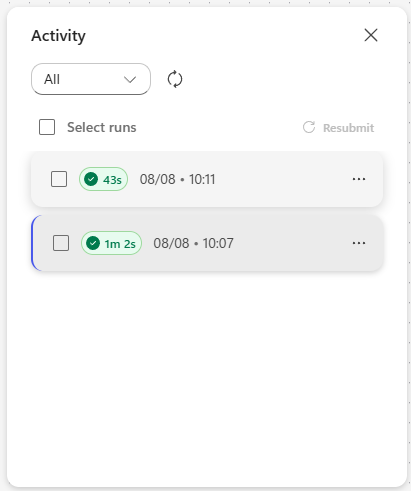
Both workflow runs completed in around a minute or less. That response time matters for an inbound lead: the faster you acknowledge a genuine enquiry with something relevant, the less likely it is to disappear into an inbox or go to someone else.
What Did the Two Agentic Workflow Runs Cost?
This is the part that is easy to overlook when a demo works well.
Microsoft explains that workflows powered by the GitHub Copilot harness use usage-based billing. Copilot Credits can be consumed by the harness, LLM tokens, tools, and knowledge access. The exact consumption therefore depends on what the workflow asks the model and agents to do, not simply the number of times the trigger fires.
You can read Microsoft’s current explanation in the Copilot Credits billing overview.
After running this scenario twice, my billing report showed the following:
| Resource | Billed Copilot Credits |
|---|---|
| Inbound Lead Workflow | 1.30 |
| Classify | 26.62 |
| Consulting | 18.46 |
| Training | 41.18 |
| Total | 87.56 |
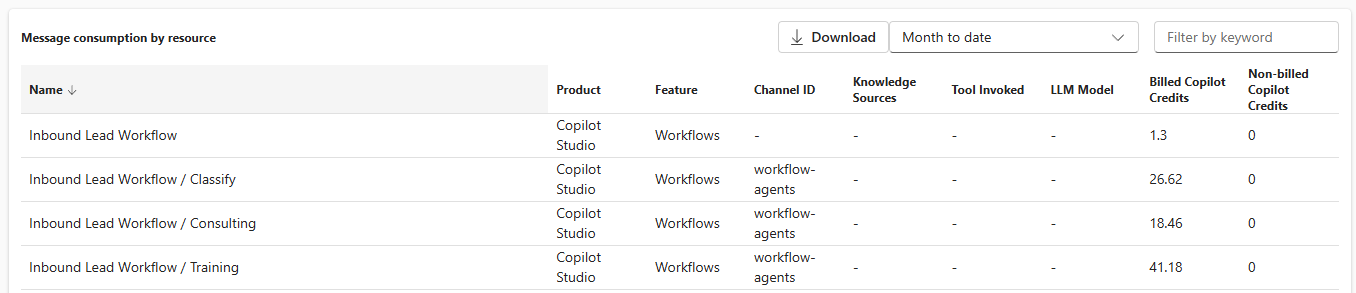
At $0.01 per Copilot Credit, that is approximately $0.88 for two completed workflow runs, or an observed average of roughly $0.44 per inbound lead in this test.
That average needs context. The two runs did not perform identical work:
- The consulting agent followed its instructions, drafted an email, and sent a Teams notification.
- The training agent queried knowledge to establish the available courses before composing its response, sending an email, and notifying me in Teams.
The training agent consumed 41.18 credits, compared with 18.46 credits for consulting. That does not make knowledge grounding a bad choice - it provided the useful course recommendations shown in the demo - but it shows that richer reasoning and knowledge retrieval have a measurable cost.
It is also worth noting that the classification step consumed 26.62 credits across the two runs. Even before an agent takes action, asking an LLM to interpret and route every submission contributes to the bill.
Is $0.44 per Lead Expensive?
That depends entirely on the value of the process.
If this workflow were classifying low-value messages at high volume, I would question whether every branch needed an LLM or an agent. Traditional conditions, validation, or a lightweight notification might be more appropriate.
For a genuine consulting or training enquiry, however, spending less than a dollar across two tests to provide a fast and relevant response could be excellent value. A single converted lead could easily outweigh the automation cost.
The more useful question is not simply, “How much did the agent cost?” It is:
Did the agent perform work that was valuable enough to justify the credits it consumed?
Designing Agentic Workflows with Cost in Mind
This demo reinforced a few design principles for me.
Use agents where judgement adds value
The consulting and training branches benefit from interpreting free-text requirements and producing a tailored response. An event speaker enquiry only needs to notify me with a link to the list item, so I can use a normal Teams action instead.
Keep deterministic work deterministic
Do not use an agent simply because one is available. If a connector action or condition can complete the task reliably, it will usually be easier to understand, test, and forecast.
Expect knowledge to add both value and consumption
The training agent was the most expensive branch, but it also performed the richest task. It searched the course list, matched the enquiry to relevant training, included pricing, and identified missing details.
Decide where the human approval point belongs
For consulting, the agent creates a draft. For training, it sends the email. That is an intentional risk decision, not just a technical setting.
Monitor real runs, not just estimates
The workflow design tells you what should happen. The activity history and billing report tell you how long it took and what it consumed. I would monitor both before scaling a workflow like this across a high-volume process.
Practical Takeaways
- Start with an existing process and add agentic capability only where it improves the outcome.
- Use classification to route unstructured requests, but remember that classification also consumes credits.
- Reserve agents for branches that need interpretation, reasoning, knowledge, or dynamic communication.
- Compare the cost of each branch with the business value it creates.
- Test different scenarios because a knowledge-grounded agent can consume significantly more than a simpler agent.
- Review Copilot Credit consumption in the Power Platform admin center before moving from a demo to production.
Final Thoughts
I like this scenario because it is small enough to understand but complete enough to demonstrate what an agentic workflow can do. A SharePoint item is created, an LLM classifies the enquiry, and the workflow decides whether to use a straightforward action or delegate the work to an agent.
The result is genuinely useful: a customer can receive a relevant response within seconds, while I receive the context I need in Teams or a prepared draft in Outlook.
But the billing data is just as important as the successful run. My two tests consumed 87.56 Copilot Credits, approximately $0.88 at one cent per credit. That feels reasonable for this inbound lead scenario, but it is a reminder that agentic design is also commercial design. We need to understand not only whether an agent can complete the work, but whether the value of that work justifies its consumption at scale.
For more practical demos covering Copilot Studio, Power Platform, automation, and AI agents, subscribe to the DamoBird365 YouTube channel.