Need to send personalised emails with unique attachments — like monthly invoices — to a list of customers? In this post, I’ll show you how to build a mail merge with attachments in Power Automate, pulling customer data from Excel and attaching the right file for each recipient automatically.
If you have a requirement for creating invoices in an automated fashion please take a look at some of my other ideas here:
Perfectly Complete an Excel Invoice Template
The Data Source
Using a traditional Excel file as the customer data source, I have a list of names, emails, account numbers, amount due and a due date. I will use some of these fields to create the mail merge email content but also the Account Number to retrieve the file relevant to the customer when sending an attachment.
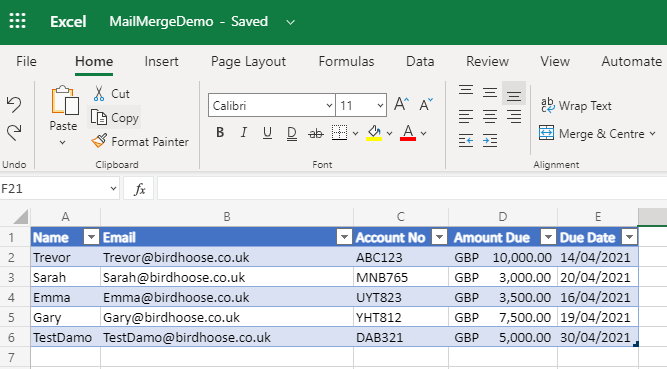
Customer Details in Excel but this could be in Dataverse or a SharePoint List
The Personalised Attachments
In my example I have created PDF files with a consistent filename format using the customer account number and the month. From my cloud flow I will combine last month with the customer account number in order to retrieve the customers unique file for attaching to the email.
The Cloud Flow
For the purpose of my demo the trigger is manual but you could schedule this for any day of the week or month. I get all of the customer details from the table in excel and then perform a calculation on today’s date using the formatdatetime expression to get the previous month as a full name. The expression used is:
formatDateTime(body(‘Get_past_time’),‘MMMM’)
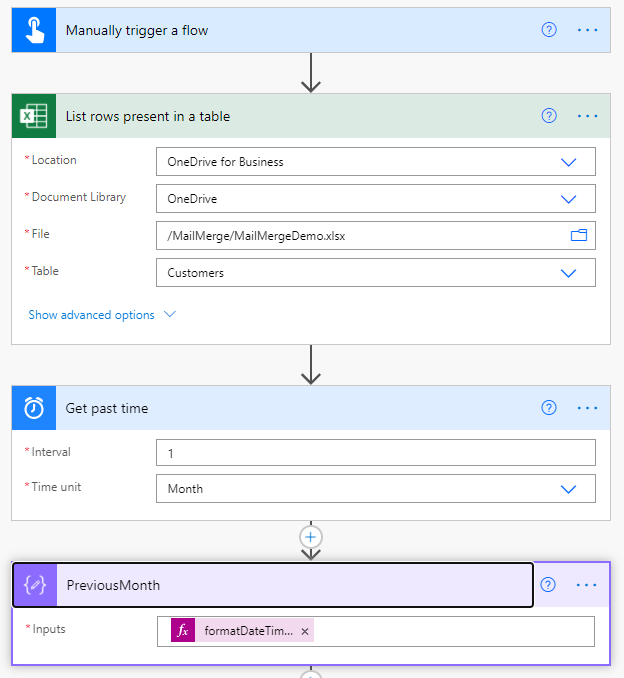
The start of the Cloud Flow
Then using the Account number and the previous month compose action, I dynamically create the file path in a Compose action, use this to get the content of their personalised invoice file using the get file content using path action and finally sending the email, in my case, requesting that the user kindly pays their invoice which is due shortly based on the data in the excel table.
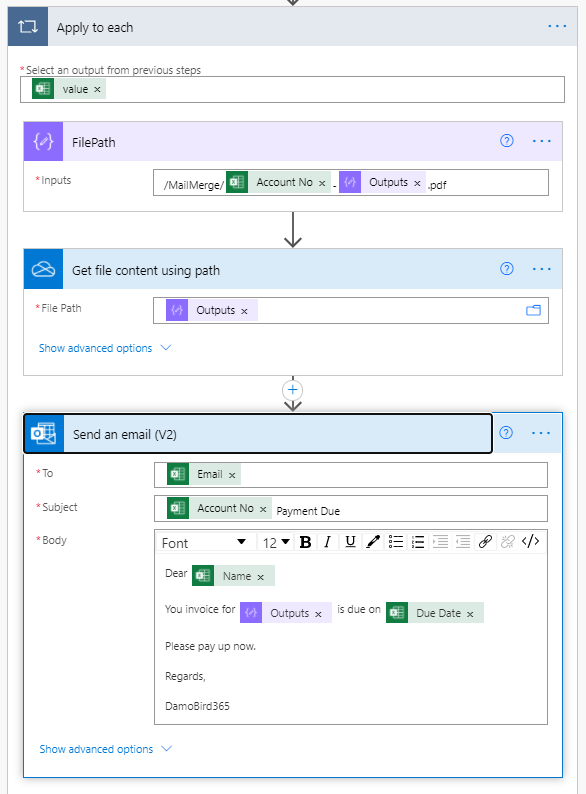
Email is sent with unique attachment for the Month
Importing the Flow
In order to allow you to see this solution first hand, I have provided you with a copy / paste option below. Simply copy this code to your clipboard and then paste into a New Step in your Cloud Flow.
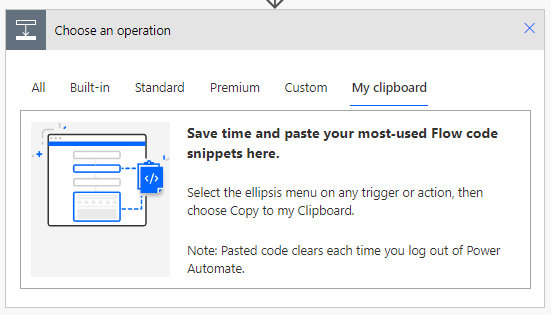
Paste the code in here
If you have an idea or problem that you would like explored in more detail, please get in touch.
{
  "id": "3dbfb590-a6c5-49ca-8999-72df-6f2a6122",
  "brandColor": "#8C3900",
  "connectionReferences": {
    "shared_office365": {
      "connection": {
        "id": "/providers/Microsoft.PowerApps/apis/shared_office365/connections/shared-office365-2c7a215d-616e-4cc2-9dab-9d05f14c21a5"
      }
    },
    "shared_onedriveforbusiness": {
      "connection": {
        "id": "/providers/Microsoft.PowerApps/apis/shared_onedriveforbusiness/connections/shared-onedriveforbu-5a107753-9d6f-4fbf-957e-72c6-987acc35"
      }
    },
    "shared_excelonlinebusiness": {
      "connection": {
        "id": "/providers/Microsoft.PowerApps/apis/shared_excelonlinebusiness/connections/shared-excelonlinebu-47960226-b338-4d03-bbc1-dcfb-43cc2fda"
      }
    }
  },
  "connectorDisplayName": "Control",
  "icon": "data:image/svg+xml;base64,PHN2ZyB3aWR0aD0iMzIiIGhlaWdodD0iMzIiIHZlcnNpb249IjEuMSIgdmlld0JveD0iMCAwIDMyIDMyIiB4bWxucz0iaHR0cDovL3d3dy53My5vcmcvMjAwMC9zdmciPg0KIDxwYXRoIGQ9Im0wIDBoMzJ2MzJoLTMyeiIgZmlsbD0iIzhDMzkwMCIvPg0KIDxwYXRoIGQ9Im04IDEwaDE2djEyaC0xNnptMTUgMTF2LTEwaC0xNHYxMHptLTItOHY2aC0xMHYtNnptLTEgNXYtNGgtOHY0eiIgZmlsbD0iI2ZmZiIvPg0KPC9zdmc+DQo=",
  "isTrigger": false,
  "operationName": "DamoBird365MailMergeWithAttachment",
  "operationDefinition": {
    "type": "Scope",
    "actions": {
      "List_rows_present_in_a_table": {
        "type": "OpenApiConnection",
        "inputs": {
          "host": {
            "connectionName": "shared_excelonlinebusiness",
            "operationId": "GetItems",
            "apiId": "/providers/Microsoft.PowerApps/apis/shared_excelonlinebusiness"
          },
          "parameters": {
            "source": "me",
            "drive": "b!BOIVsACSM02nAvrKA5sQqce2eGDhytpJrD6Ky1g1xl_-qoaIOl6yRo2252_HSDPt",
            "file": "01SRF3RDWC6SQYQDGKLNBIX6BIKTM543KR",
            "table": "{CCB1679D-EA2B-4826-9B8D-268E78A580B9}"
          },
          "authentication": {
            "type": "Raw",
            "value": "@json(decodeBase64(triggerOutputs().headers['X-MS-APIM-Tokens']))['$ConnectionKey']"
          }
        },
        "runAfter": {},
        "metadata": {
          "01SRF3RDWC6SQYQDGKLNBIX6BIKTM543KR": "/MailMerge/MailMergeDemo.xlsx",
          "tableId": "{CCB1679D-EA2B-4826-9B8D-268E78A580B9}"
        }
      },
      "Get_past_time": {
        "type": "Expression",
        "kind": "GetPastTime",
        "inputs": {
          "interval": 1,
          "timeUnit": "Month"
        },
        "runAfter": {
          "List_rows_present_in_a_table": [
            "Succeeded"
          ]
        }
      },
      "PreviousMonth": {
        "type": "Compose",
        "inputs": "@formatDateTime(body('Get_past_time'),'MMMM')",
        "runAfter": {
          "Get_past_time": [
            "Succeeded"
          ]
        }
      },
      "Apply_to_each": {
        "type": "Foreach",
        "foreach": "@outputs('List_rows_present_in_a_table')?['body/value']",
        "actions": {
          "Get_file_content_using_path": {
            "type": "OpenApiConnection",
            "inputs": {
              "host": {
                "connectionName": "shared_onedriveforbusiness",
                "operationId": "GetFileContentByPath",
                "apiId": "/providers/Microsoft.PowerApps/apis/shared_onedriveforbusiness"
              },
              "parameters": {
                "path": "@outputs('FilePath')",
                "inferContentType": true
              },
              "authentication": {
                "type": "Raw",
                "value": "@json(decodeBase64(triggerOutputs().headers['X-MS-APIM-Tokens']))['$ConnectionKey']"
              }
            },
            "runAfter": {
              "FilePath": [
                "Succeeded"
              ]
            }
          },
          "Send_an_email_(V2)": {
            "type": "OpenApiConnection",
            "inputs": {
              "host": {
                "connectionName": "shared_office365",
                "operationId": "SendEmailV2",
                "apiId": "/providers/Microsoft.PowerApps/apis/shared_office365"
              },
              "parameters": {
                "emailMessage/To": "@items('Apply_to_each')?['Email']",
                "emailMessage/Subject": "@{items('Apply_to_each')?['Account No']} Payment Due",
                "emailMessage/Body": "<p>Dear @{items('Apply_to_each')?['Name']}<br>\n<br>\nYou invoice for @{outputs('PreviousMonth')} is due on @{items('Apply_to_each')?['Due Date']}<br>\n<br>\nPlease pay up now.<br>\n<br>\nRegards,<br>\n<br>\nDamoBird365</p>",
                "emailMessage/Attachments": [
                  {
                    "Name": "@{outputs('PreviousMonth')}-@{items('Apply_to_each')?['Account No']}.pdf",
                    "ContentBytes": "@outputs('Get_file_content_using_path')?['body']"
                  }
                ]
              },
              "authentication": {
                "type": "Raw",
                "value": "@json(decodeBase64(triggerOutputs().headers['X-MS-APIM-Tokens']))['$ConnectionKey']"
              }
            },
            "runAfter": {
              "Get_file_content_using_path": [
                "Succeeded"
              ]
            }
          },
          "FilePath": {
            "type": "Compose",
            "inputs": "/MailMerge/@{items('Apply_to_each')?['Account No']}-@{outputs('PreviousMonth')}.pdf",
            "runAfter": {}
          }
        },
        "runAfter": {
          "PreviousMonth": [
            "Succeeded"
          ]
        }
      }
    },
    "runAfter": {}
  }
}