Want to @mention an entire Team or Channel from a Power Automate flow? The default Teams actions don’t support it out of the box — but with a simple Graph API call, it’s surprisingly straightforward. In this post and video, I’ll walk you through exactly how to set it up.
First, choose your Team and Channel
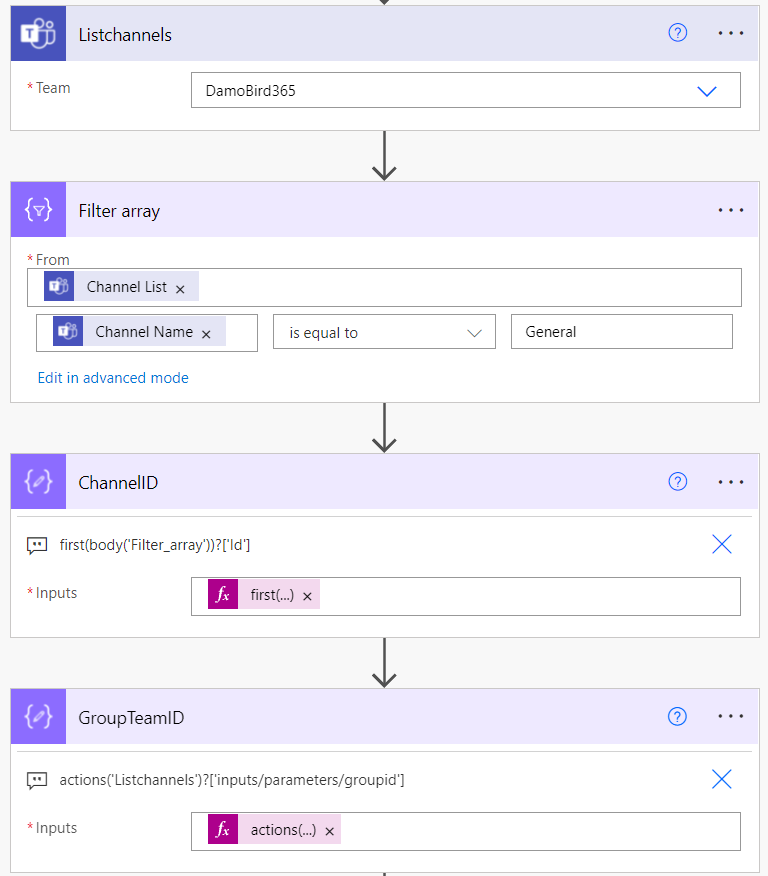
By using the List Channels Action in Power Automate, we are able to obtain a list of Channels for a particular Group, but not only that, we are able to retrieve the Group ID from the Input Parameters as shown in the last of the four actions below (the Compose - GroupTeamID). We are going to post on the General Channel, and for us to obtain the Channel ID, we filter the array from the List Channels Action for “General” and then retrieve the first() and most likely the only object returned by the filter by using a compose and selecting the Id.
Constructing our Graph API Request
Thankfully, due to a new action, calling the Graph API has recently been made a lot simpler and the message will be posted as you, the logged-on user. You would have previously had to construct a couple of HTTP calls or build a custom connector in order to achieve this.
The Channel Mention and Team mention have slightly different JSON Body Payloads, which I will provide for you to copy below but the endpoint is exactly the same. Details of which can be read here.
graph.microsoft.com/v1.0/teams/{teamId}/channels/{channelId}/messages
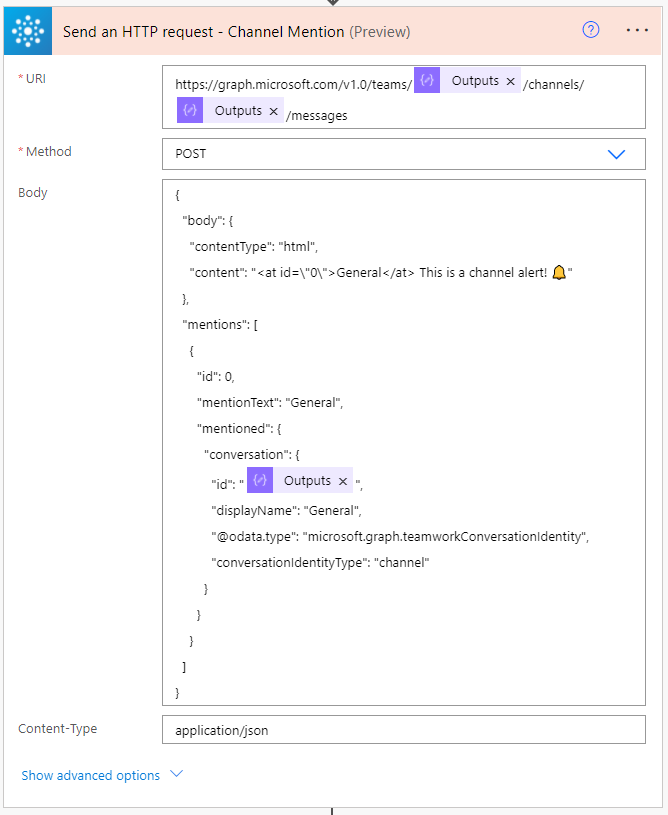
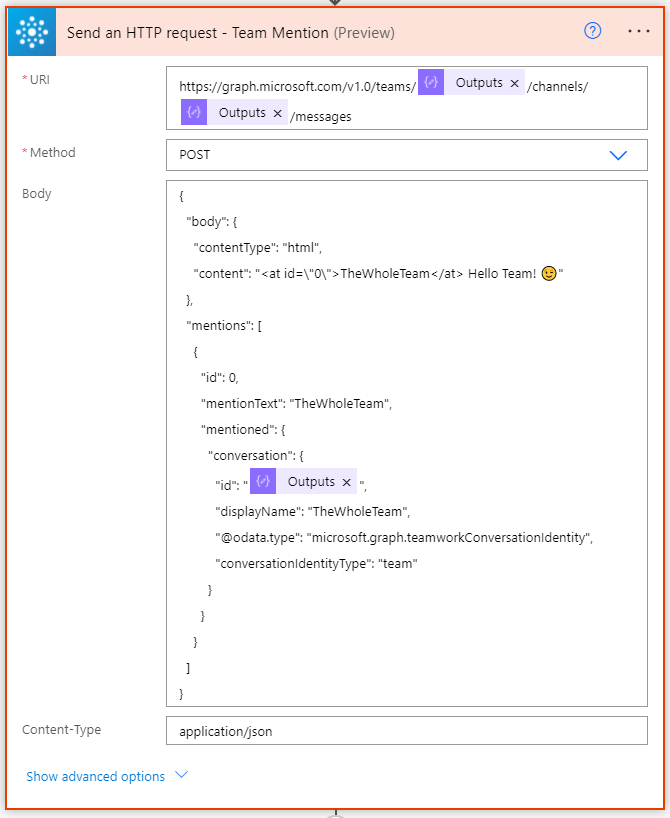
Note that for both actions, you must call the mention with an HTML AT tag. Your Mentions Array can have multiple users, channels, or teams to tag. I will show you in my YouTube video how I was able to individually tag all users in a security group using a select action.
Channel Mention
{
  "body": {
    "contentType": "html",
    "content": "<at id=\"0\">General</at> This is a channel alert! 🔔"
  },
  "mentions": [
    {
      "id": 0,
      "mentionText": "General",
      "mentioned": {
        "conversation": {
          "id": "@{outputs('ChannelID')}",
          "displayName": "General",
          "@odata.type": "microsoft.graph.teamworkConversationIdentity",
          "conversationIdentityType": "channel"
        }
      }
    }
  ]
}
Team Mention
{
  "body": {
    "contentType": "html",
    "content": "<at id=\"0\">TheWholeTeam</at> Hello Team! 😉"
  },
  "mentions": [
    {
      "id": 0,
      "mentionText": "TheWholeTeam",
      "mentioned": {
        "conversation": {
          "id": "@{outputs('GroupTeamID')}",
          "displayName": "TheWholeTeam",
          "@odata.type": "microsoft.graph.teamworkConversationIdentity",
          "conversationIdentityType": "team"
        }
      }
    }
  ]
}
Note that for both Mentions, you must update the mentionText, displayName and value contained within the HTML AT Tag for this to work. My values are fixed, you can of course make these dynamic.
Mention the Channel and Team in one Post
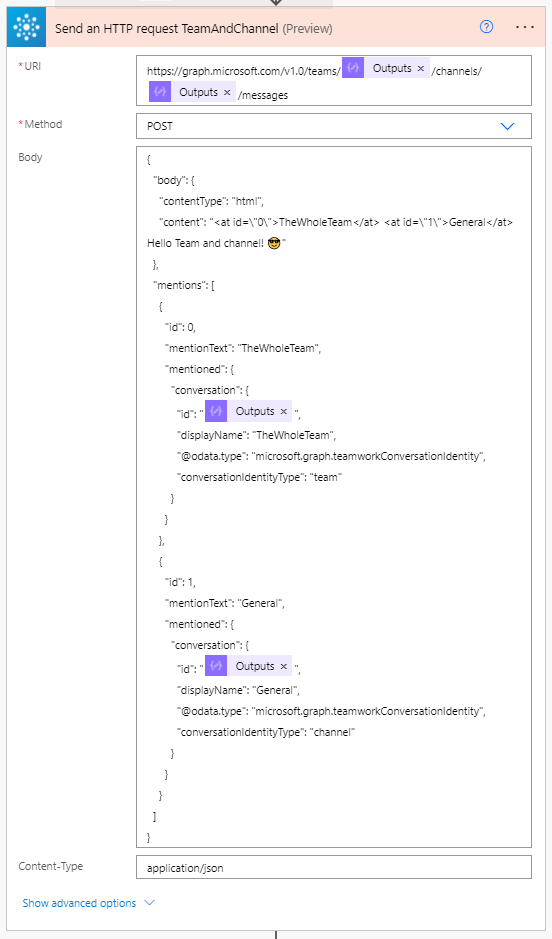
Using the above examples you can now automatically tag a team or a channel in Teams via Power Automate. Please let me know below how you might use this in your scenario.