Still getting emails from colleagues when they could just message you on Teams? I built a simple Power Automate flow that lets you flag an email in Outlook and instantly transfer the conversation to a Teams chat — no more messy reply-all threads.
How It Works
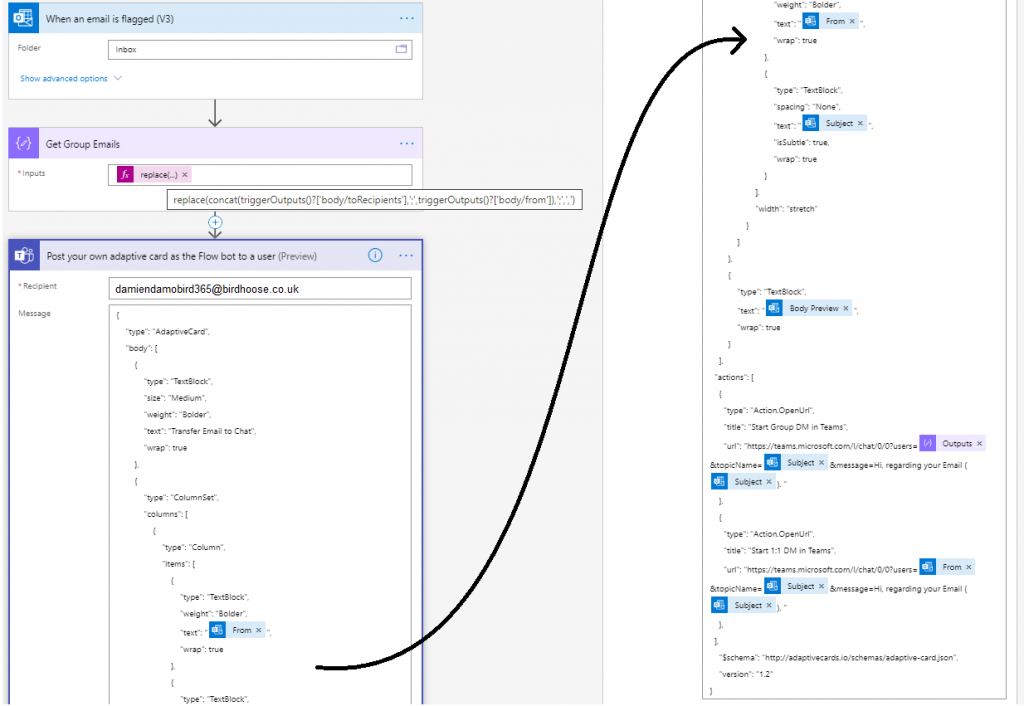
The simplest way for me, to transfer the conversation from Outlook and trigger a flow, was to use “When an email is flagged” trigger. Therefore I can simply flag an email in Outlook and take the conversation onto Teams.
With the variables provided by the email trigger, I compose the to and from fields in order to get all mail recipients and simply replace the semi colon with a comma, this is needed for the next and final step.
Finally using the “Post your own adaptive card as the Flow bot to a user” step, I am able to send an adaptive card notification in Teams to myself and provide a summary of the email I am transferring, from, subject and body preview and in my case the option to start a 1:1 chat with the sender or a group chat if there are more than one recipients of the email. This is done using the Deep Link feature of Teams.
I have supplied a copy/paste option at the end of my post that will allow you to replicate this in your personal PowerAutomate / Teams environment in a matter of seconds. **NOTE** make sure you update the TO field in the post adaptive card action as it’s currently set to youremail[at]yourdomain[dot]com.
The Power Automate Flow
The User Experience
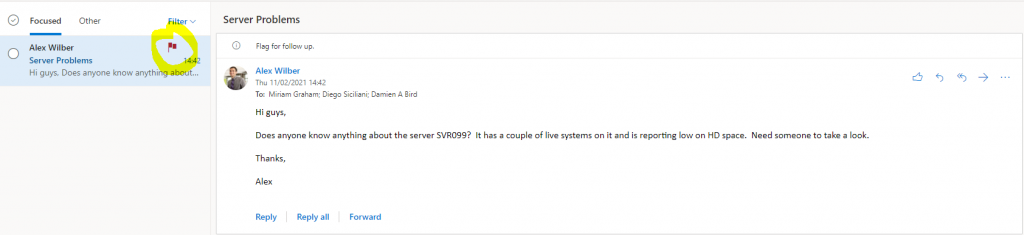
Email is received in Outlook and flagged by user
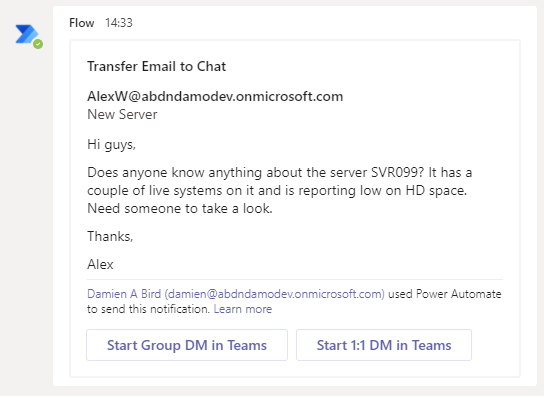
A flow bot message is sent to Teams
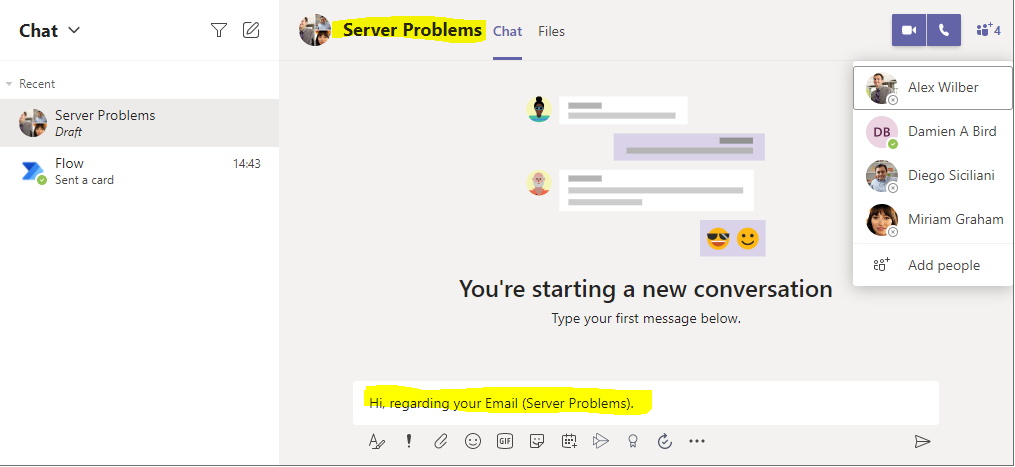
A new group message is built with subject and opening conversation
Try It Yourself
If you want to give this a go yourself, create a new cloud flow with the trigger “when an email is flagged” or the trigger of your choice and then copy and paste the code into the clipboard of Power Automate. **NOTE** make sure you update the TO field in the post adaptive card action as it’s currently set to youremail[at]yourdomain[dot]com.
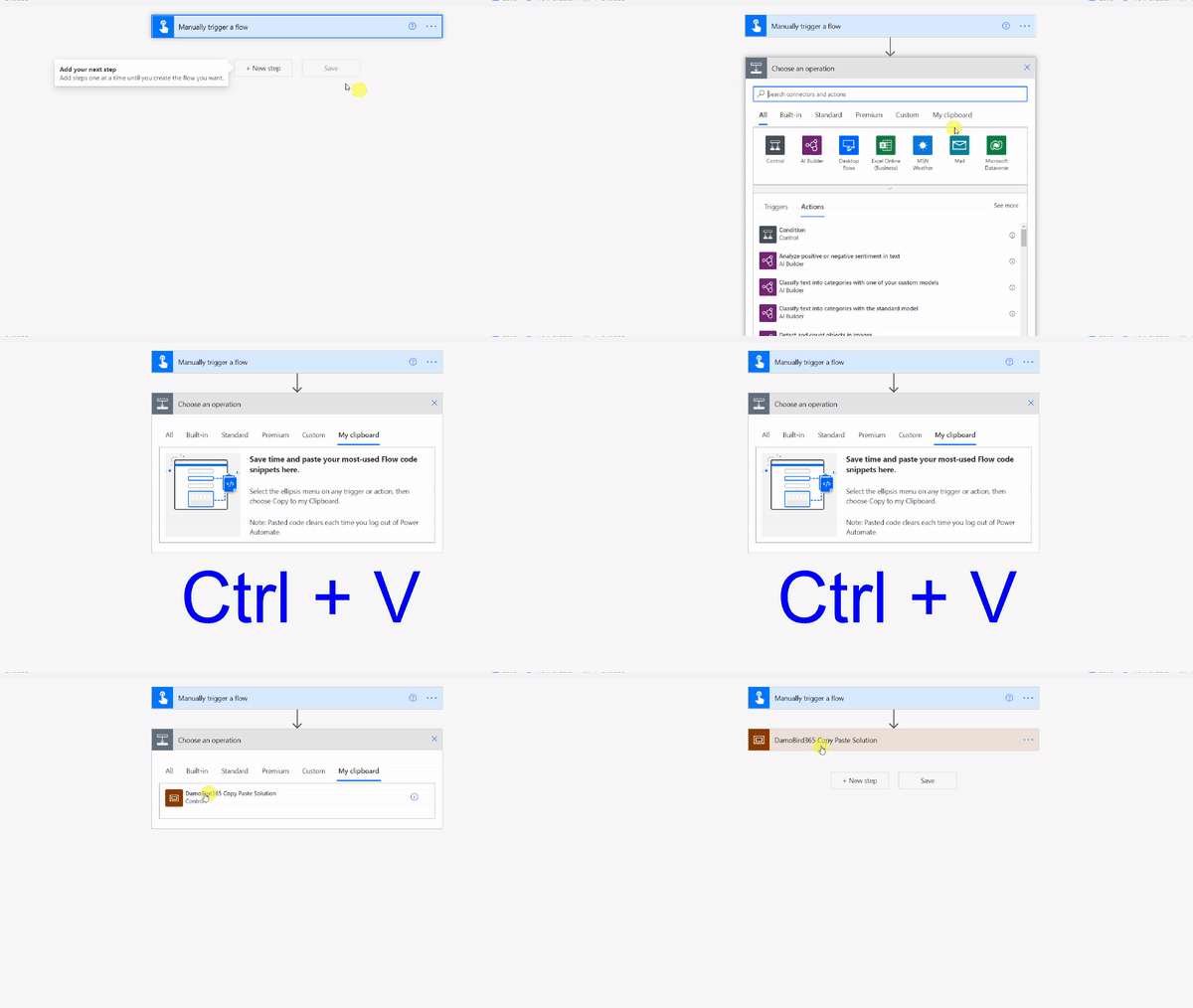
Quick Solution
Want a quick solution? Copy the code below and Ctrl + V into your Cloud Flow
{"id":"f616b2c7-1645-4360-aff5-1710-a2bfb6a1","brandColor":"#8C3900","connectionReferences":{"shared_office365":{"connection":{"id":"/providers/Microsoft.PowerApps/apis/shared_office365/connections/shared-office365-2c7a215d-616e-4cc2-9dab-9d05f14c21a5"}},"shared_teams_1":{"connection":{"id":"/providers/Microsoft.PowerApps/apis/shared_teams/connections/shared-teams-c32e6b36-e3dd-4ca6-806d-5969ba7e6dee"}}},"connectorDisplayName":"Control","icon":"data:image/svg+xml;base64,PHN2ZyB3aWR0aD0iMzIiIGhlaWdodD0iMzIiIHZlcnNpb249IjEuMSIgdmlld0JveD0iMCAwIDMyIDMyIiB4bWxucz0iaHR0cDovL3d3dy53My5vcmcvMjAwMC9zdmciPg0KIDxwYXRoIGQ9Im0wIDBoMzJ2MzJoLTMyeiIgZmlsbD0iIzhDMzkwMCIvPg0KIDxwYXRoIGQ9Im04IDEwaDE2djEyaC0xNnptMTUgMTF2LTEwaC0xNHYxMHptLTItOHY2aC0xMHYtNnptLTEgNXYtNGgtOHY0eiIgZmlsbD0iI2ZmZiIvPg0KPC9zdmc+DQo=","isTrigger":false,"operationName":"DamoBird365_Transfer_Email_To_Teams","operationDefinition":{"type":"Scope","actions":{"Get_All_To_and_From_Emails":{"type":"Compose","inputs":"@replace(tolower(concat(triggerOutputs()?['body/toRecipients'], ';', triggerOutputs()?['body/from'])), ';', ',')","runAfter":{}},"Post_your_own_adaptive_card_as_the_Flow_bot_to_a_user":{"type":"OpenApiConnection","inputs":{"host":{"connectionName":"shared_teams_1","operationId":"PostUserAdaptiveCard","apiId":"/providers/Microsoft.PowerApps/apis/shared_teams"},"parameters":{"PostAdaptiveCardRequest/recipient/to":"youremail[at]yourdomain[dot]com;","PostAdaptiveCardRequest/messageBody":"{\n \"type\": \"AdaptiveCard\",\n \"body\": [\n {\n \"type\": \"TextBlock\",\n \"size\": \"Medium\",\n \"weight\": \"Bolder\",\n \"text\": \"Transfer Email to Chat\",\n \"wrap\": true\n },\n {\n \"type\": \"ColumnSet\",\n \"columns\": [\n {\n \"type\": \"Column\",\n \"items\": [\n {\n \"type\": \"TextBlock\",\n \"weight\": \"Bolder\",\n \"text\": \"@{triggerOutputs()?['body/from']}\",\n \"wrap\": true\n },\n {\n \"type\": \"TextBlock\",\n \"spacing\": \"None\",\n \"text\": \"@{triggerOutputs()?['body/subject']}\",\n \"isSubtle\": true,\n \"wrap\": true\n }\n ],\n \"width\": \"stretch\"\n }\n ]\n },\n {\n \"type\": \"TextBlock\",\n \"text\": \"@{triggerOutputs()?['body/bodyPreview']}\",\n \"wrap\": true\n }\n ],\n \"actions\": [\n {\n \"type\": \"Action.OpenUrl\",\n \"title\": \"Start Group DM in Teams\",\n \"url\": \"https://teams.microsoft.com/l/chat/0/0?users=@{outputs('Get_All_To_and_From_Emails')}&topicName=@{triggerOutputs()?['body/subject']}&message=Hi, regarding your Email (@{triggerOutputs()?['body/subject']}). \"\n },\n {\n \"type\": \"Action.OpenUrl\",\n \"title\": \"Start 1:1 DM in Teams\",\n \"url\": \"https://teams.microsoft.com/l/chat/0/0?users=@{triggerOutputs()?['body/from']}&topicName=@{triggerOutputs()?['body/subject']}&message=Hi, regarding your Email (@{triggerOutputs()?['body/subject']}). \"\n },\n ],\n \"$schema\": \"http://adaptivecards.io/schemas/adaptive-card.json\",\n \"version\": \"1.2\"\n}","PostAdaptiveCardRequest/messageTitle":"Transfer Email To Teams"},"authentication":"@parameters('$authentication')"},"runAfter":{"Get_All_To_and_From_Emails":["Succeeded"]}}},"runAfter":{},"description":"***Please make sure you update the TO: in the Adaptive Card***"}}
What do you think? Could this work for your adoption? How else might you trigger this Cloud Flow / PowerAutomate?