I built a browser extension. Honestly, I never thought I’d say that — but here we are. TabHawk is my first foray into the world of Chrome extensions, and it’s been one of the most rewarding side projects I’ve taken on. If you’ve ever looked at your browser and thought “how did I end up with 47 tabs?” — or if you’re someone whose brain just works a bit differently and keeping focus means keeping things tidy — this one’s for you.
Why I Built TabHawk
Like a lot of my projects, TabHawk started with a personal frustration. I’m someone who works across Power Automate, Power Apps, SharePoint, Azure, GitHub — and before I know it, I’ve got 40+ tabs open and absolutely no idea where anything is. I’d waste time hunting for that one tab buried behind twelve others, only to discover I had three copies of it open already.
If that sounds familiar, you’re not alone. Whether it’s ADHD, neurodivergence, or just the reality of modern knowledge work — tab overload is real, and it’s exhausting. That constant low-level anxiety of “I know it’s open somewhere” pulls you out of flow and chips away at your focus. I wanted a tool that would just take the noise away — let me see what’s open, find what I need, and get back to what I was actually doing.
Existing extensions either did too much, asked for too many permissions, or didn’t quite fit. So I thought — why not build my own?
What TabHawk Does
TabHawk is designed to be calm and instant. No setup wizards, no onboarding flows — just open it and your tabs make sense. It’s built for people who need less friction, not more. Here’s what it does:
🔍 Find Any Tab in Seconds
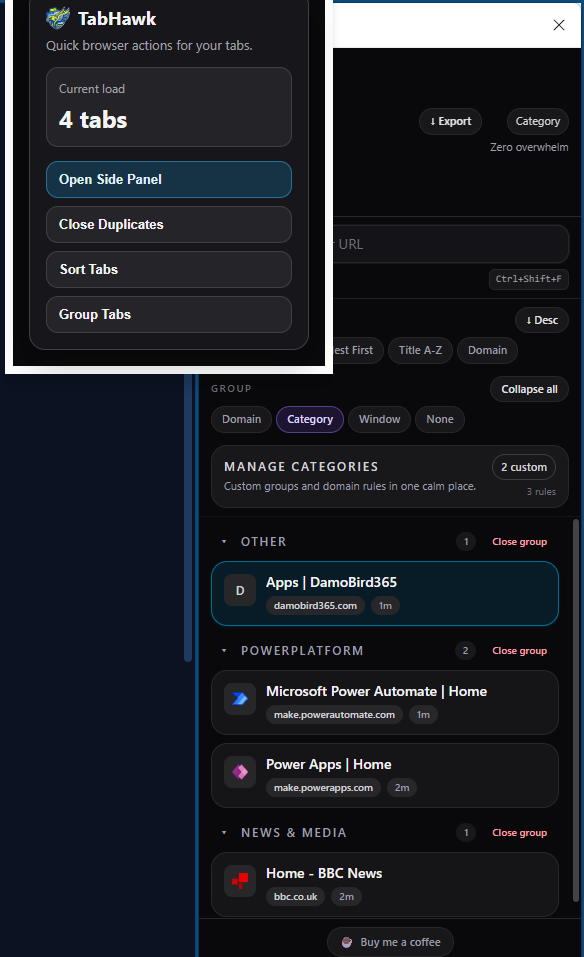
Open the side panel and start typing. TabHawk searches across all your tab titles and URLs instantly — no more squinting at tiny favicons or clicking through tab after tab trying to find the right one. If you’ve ever lost ten minutes chasing a tab you know is open, this alone is worth it.
🗂️ Automatic Categories
Tabs are automatically grouped into smart categories like Tech & Dev, Social Media, Shopping, Finance, News, and more. You can also create your own custom categories with your own rules and colours — perfect for keeping work and personal browsing separate.
🔁 Spot and Close Duplicates
This is the feature I use most. If you’re the kind of person who opens the same page three times because you forgot it was already there — no judgement, I’m right there with you — TabHawk catches those duplicates automatically, even when the URLs look slightly different. Close them with one click and instantly reduce the clutter.
📁 Tab Groups
Organise tabs into colour-coded groups by domain, category, or window — using Chrome’s built-in tab groups. Visual structure helps your brain make sense of the mess. It’s like giving your tabs a filing system without any of the effort.
📊 Export to CSV
Need a snapshot of everything you’ve got open? Export all your tabs to a spreadsheet file. Handy for bookkeeping, sharing with colleagues, or just keeping a record.
🔢 Tab Counter
See how many tabs you have open right on the toolbar icon. It’s a small thing, but it’s a gentle nudge — a quick reality check that helps you stay aware before things spiral.
🔒 100% Private
TabHawk never sends your data anywhere. Everything stays on your machine. No accounts, no analytics, no tracking. Your browsing is your business.
Building It — The Journey from Low-Code to Pro-Code
If you follow my blog, you’ll know I’ve been on a journey along the no-code to pro-code spectrum. TabHawk is another step in that direction. Building a Chrome extension meant learning about manifest files, service workers, content scripts, Chrome APIs — it’s a very different world from Power Automate flows and canvas apps.
But here’s the thing: the skills transfer more than you’d think. Understanding events and triggers, thinking about user experience, designing data flows — these are universal concepts whether you’re building a Power Automate flow or a browser extension. And with AI-assisted development tools like GitHub Copilot, the barrier to entry for pro-code projects has never been lower.
What’s Next — and I Want Your Help
This is just the beginning. I’ve got ideas for tab session saving, keyboard shortcuts, and deeper integration with productivity workflows — but I want to build what you actually need.
If you hit a bug, have a feature idea, or just want to tell me how you use TabHawk — please reach out. You can message me on LinkedIn, or drop a comment on the Chrome Web Store listing. I read everything and I genuinely want to make this better based on real feedback. This is a community tool — the roadmap is shaped by the people using it.
Get TabHawk
TabHawk is available now on the Chrome Web Store — completely free, open source, and privacy-first.
👉 Install TabHawk from the Chrome Web Store
Final Thoughts
Building TabHawk has been a brilliant learning experience. It’s reminded me that the best tools often come from scratching your own itch — solving a problem you actually have, every single day.
Whether you’re a Power Platform pro drowning in documentation tabs, someone with ADHD who needs their environment to be just right to stay focused, or simply a person who’s tired of browser chaos — I built this for you. A tidy browser means a calmer headspace, and sometimes that’s all you need to get back in the zone.
Give it a try, and let me know what you think — seriously, I want to hear from you.
For more on automation, AI, and the occasional side project, check out my YouTube channel: DamoBird365